The ATT&CK Navigator is a staple in many analysts’ toolboxes.
But here’s the thing: it doesn’t actually care whether you’re using ATT&CK.
With a bit of STIX wrangling, you can make the Navigator happily render non-ATT&CK frameworks, including MITRE ATLAS, or DISARM
Yes, really.
In this Post
In this post, we’ll use MITRE ATLAS as our running example. In my previous post, I covered ATLAS STIX objects, which is exactly the format the ATT&CK Navigator consumes. Now we’ll take the next step and see what it actually takes to make that data render correctly as a matrix.
Specifically, we’ll walk through:
- Which STIX properties the Navigator actually uses when building a matrix
- How ATLAS tactics, techniques, and sub-techniques need to be modelled to render as expected
- The practical limitations you’ll run into (notably sub-sub-techniques)
- What the final ATLAS Navigator layer looks like once everything is wired together
The Technicalities
This is where we drop below the conceptual layer and into the mechanics.
The ATT&CK Navigator doesn’t interpret STIX generically, it looks for a very specific set of object types and properties when deciding how (and whether) to render a matrix. If those expectations aren’t met, things either fail silently or render in ways that are confusing to debug.
In this section, we’ll walk through the exact STIX objects and fields the Navigator relies on, starting at the matrix level and working our way down.
Matrix
There must be a tactic_refs propert listing the STIX IDs of all Tactic objects
"tactic_refs": [
	"x-mitre-tactic--8d151547-7423-5bac-bc2d-a6fd02afba29",
	"x-mitre-tactic--39099d7c-9fb7-5836-8e8a-9f6b594bf01b",
	"x-mitre-tactic--7c7c780a-8d98-5457-bc1e-d876c111a512",
	"x-mitre-tactic--e78b4630-6ed6-5f22-9409-f6f4fcf4e78c",
	"x-mitre-tactic--6be7de41-9e78-5b9e-b3cb-cd48b3e6bdfe",
	"x-mitre-tactic--447330f2-1345-5a48-a938-877944a0ad5c",
	"x-mitre-tactic--7507bd74-3e82-5dda-a16d-1ca38c59dd66",
	"x-mitre-tactic--22a483dc-1102-5fd0-94bd-b4259c537274",
	"x-mitre-tactic--cba15346-d63f-5cdd-b001-112125f9f158",
	"x-mitre-tactic--5ec2f5ad-ca32-5d36-bfb8-fad1fd429dbd",
	"x-mitre-tactic--abaefe4f-7544-5972-840d-543910eaf5ca",
	"x-mitre-tactic--bc075036-5189-5683-98b7-1df4bf86d242",
	"x-mitre-tactic--06017740-23bb-5d05-b6d5-366ce7f5d783",
	"x-mitre-tactic--a3756441-3a3a-55c3-86f6-47aec26cb412",
	"x-mitre-tactic--3251e0ce-df2f-517f-8866-69e6981d5d9c",
	"x-mitre-tactic--a2fbbf3d-7e8d-5a1b-85cc-8e8fa4a76de3"
],
The order of this list must match the order you want to show the Tactics in the Matrix.
For example, Reconnaissance (x-mitre-tactic--8d151547-7423-5bac-bc2d-a6fd02afba29) is the first Tactic in the Matrix.
The first entry in tactic_refs will be rendered furthest left (first), and the others will follow left to right in the order defined.
Tactics
Should have an external_references property with a nested object defining the ATLAS Tactic ID.
"external_references": [
	{
		"source_name": "mitre-atlas",
		"url": "https://atlas.mitre.org/tactics/AML.TA0002",
		"external_id": "AML.TA0002"
	}
And a x_mitre_shortname property with a machine friendly slug (to be used in Technique and Sub-Technique objects).
"x_mitre_shortname": "reconnaissance"
Techniques and Sub-Techniques
Should have an external_references property with a nested object defining the ATLAS Technique or Sub-Technique ID.
"external_references": [
	{
		"source_name": "mitre-atlas",
		"url": "https://atlas.mitre.org/techniques/AML.T0006",
		"external_id": "AML.T0006"
	}
A x_mitre_is_subtechnique value (boolean) defining if this is a Technique or Sub-Technique.
"x_mitre_is_subtechnique": true
And a kill_chain_phases nested object with the phase_name matches the x_mitre_shortname of the Tactic this Technique or Sub-Technique is nested in.
"kill_chain_phases": [
	{
		"kill_chain_name": "mitre-atlas",
		"phase_name": "reconnaissance"
	}
],
Relationships
Should link Sub-Techniques (source_ref) to Techniques (target_ref), and Sub-Techniques to Sub-Techniques with the relationship_type equal to subtechnique-of.
"relationship_type": "subtechnique-of"
The Result
Once all of those pieces are in place, the matrix, tactics, techniques, and relationships, the Navigator finally has enough information to do its job.
At this point, we’re no longer thinking in terms of STIX objects and properties. We’re switching back to the Navigator’s perspective: given a valid STIX bundle, can it render as a layer.
Here’s how you can verify that the Navigator can consume what you’ve built.
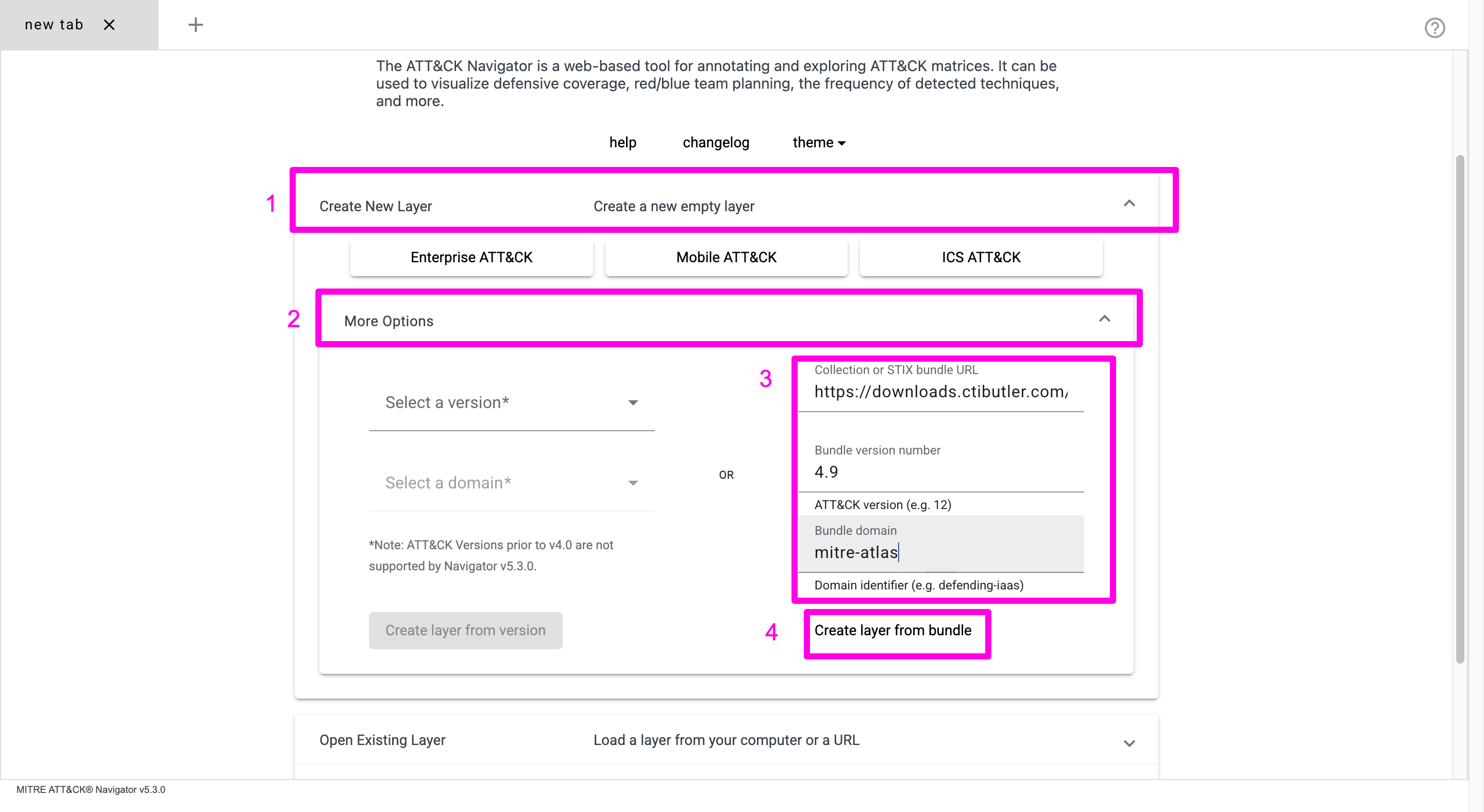
- Go to the ATT&CK Navigator
- Select Create New Layer > More Options
- Select the STIX bundle
- Create a layer from the bundle
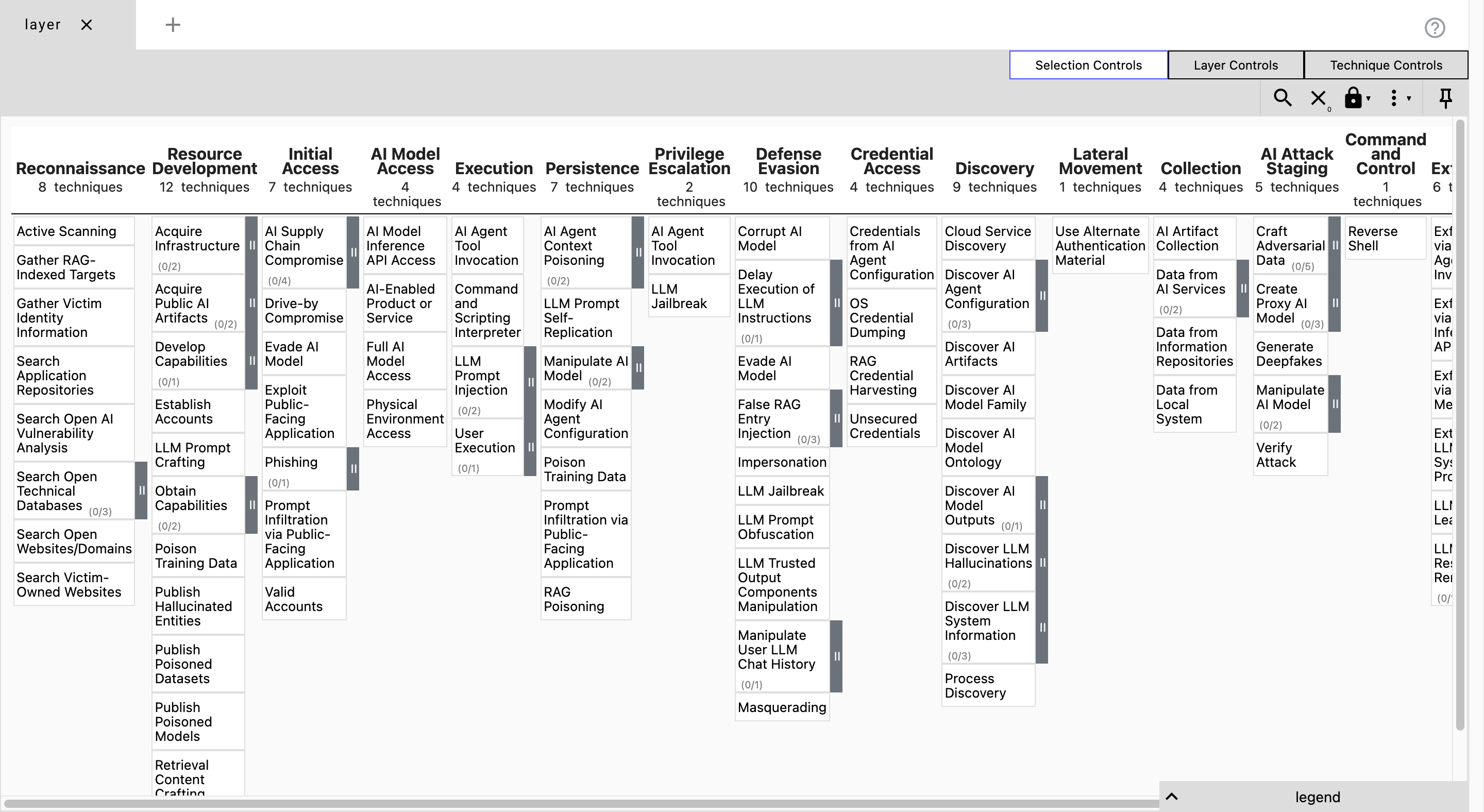
OK, it’s not perfect, but for those already using the Navigator with ATT&CK, this makes it much quicker to start understanding ATLAS.
You can download Navigator-ready ATLAS and DISARM bundles from CTI Butler.

Join the discussion
Head over to the dogesec community to discuss this post with other readers and practitioners.



CTI Butler
The most important cyber threat intelligence knowledgebases.
Open-Source Projects
All dogesec commercial products are built in-part from code-bases we have made available under permissive licenses.