
In this post
We have built many OpenCTI connectors for our products.
Over that time, we’ve learned how OpenCTI actually ingests, transforms, stores, and exports STIX 2.1 — including where it diverges from the specification in ways that matter to producers.
This post is a practical guide for:
- developers building OpenCTI connectors
- teams exporting STIX for OpenCTI ingestion
- architects designing STIX-native pipelines that include OpenCTI
It assumes you already understand STIX 2.1 and want to know how OpenCTI behaves in production.
The most important mental model
OpenCTI is often described as “STIX-native”.
In practice, it is more accurate to think of it as:
- a graph platform with its own internal data model
- that accepts STIX as an ingestion format
- and exports STIX as an interoperability format
It is not a STIX object store.
When you import a STIX bundle:
- OpenCTI parses the bundle
- objects are validated against OpenCTI rules (not pure STIX spec)
- objects are recreated in OpenCTI’s internal schema
- unsupported properties, objects, and relationships are dropped
- OpenCTI-specific metadata is added
- a new STIX representation is generated on export
This process is not lossless.
Nearly every integration surprise comes from misunderstanding this pipeline.
How ingestion actually works
Think of ingestion as a transformation, not storage:
STIX bundle → validation → OpenCTI graph model → OpenCTI metadata → STIX export
Consequences:
- IDs may change
- properties may disappear
- relationships may be rewritten or rejected
- markings may be remapped
- custom objects or properties may be ignored
If you treat OpenCTI as a canonical STIX store, you will eventually hit sync and fidelity problems.
Custom STIX objects: mostly unsupported
OpenCTI does not support arbitrary custom SDOs/SCOs, even when defined correctly with Extension Definitions.
There are a few hardcoded exceptions (e.g. some MITRE ATT&CK extensions), but in general:
- Extension Definitions are ignored
- custom SDO instances are dropped
- dependent relationships may partially import but break
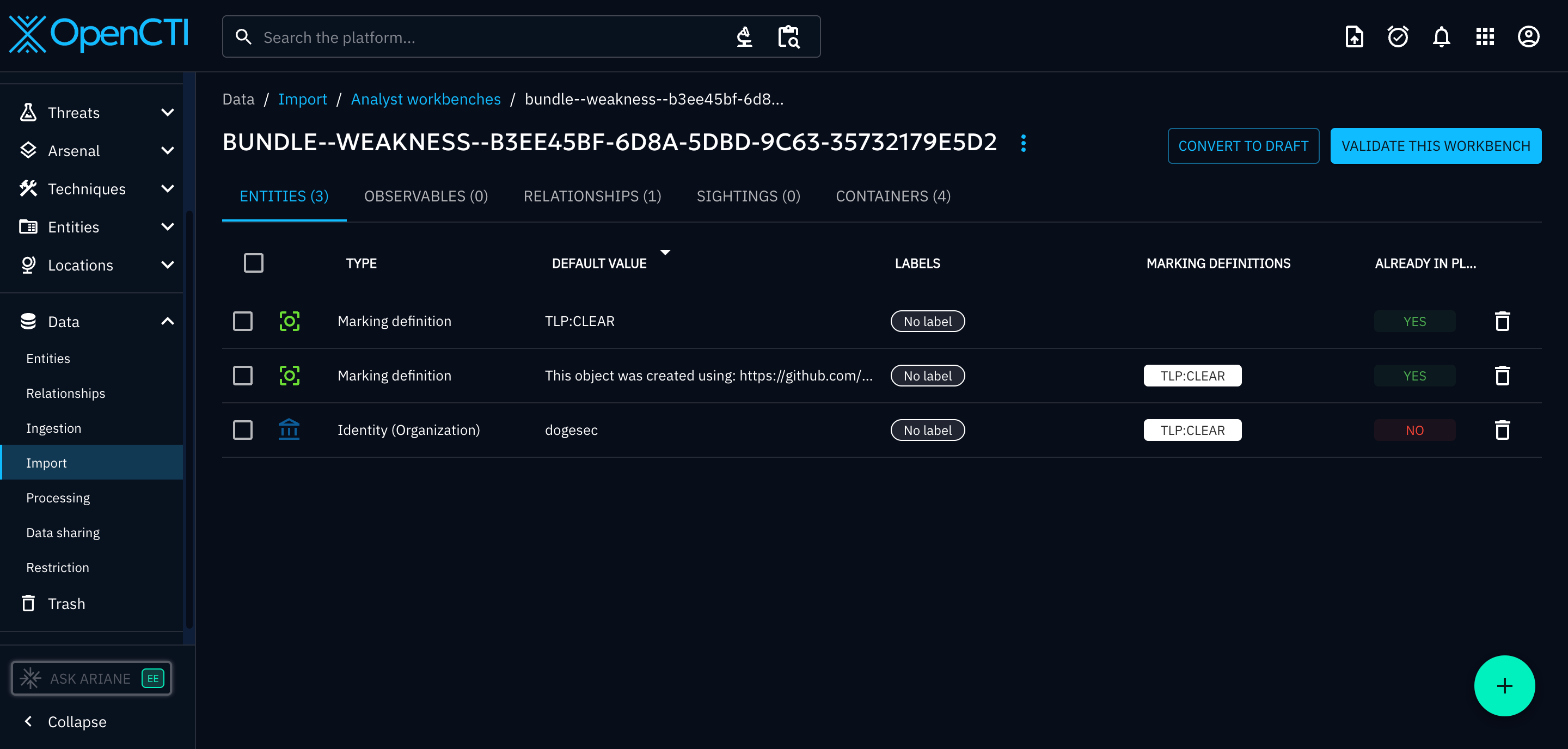
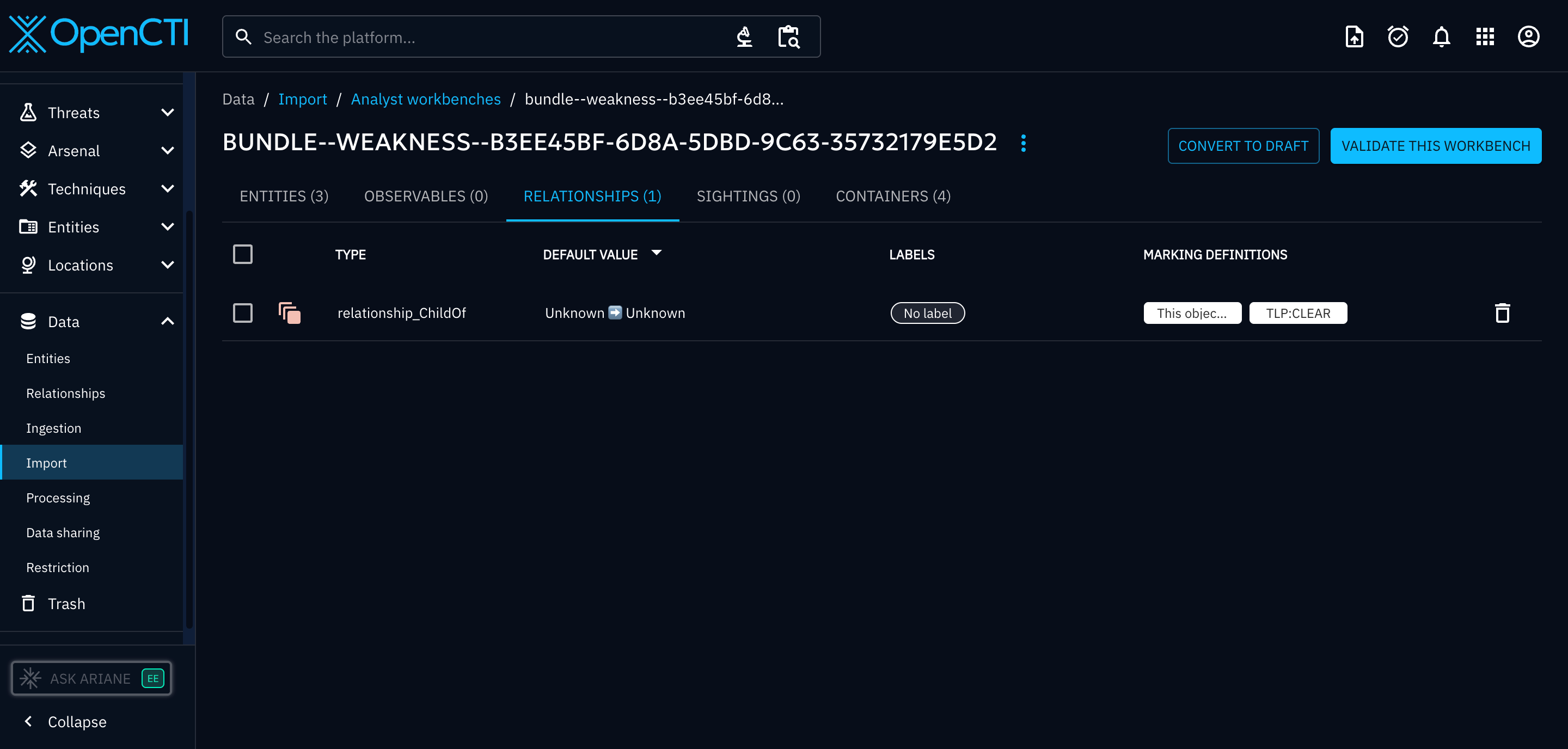
Take this bundle from CTI Butler for CWE-520. Note the use of a custom Weakness SDO (with associated Extension Definition).
Result:
- Weakness objects did not import
- Extension Definition did not import
- relationships were created but invalid (as objects missing)
This leaves producers with two choices:
- accept data loss
- transform custom SDOs into core STIX objects before ingestion
In practice, most connectors implement transformation layers.
This is why some OpenCTI connectors cannot expose full knowledge models (e.g. CWE ingestion in our CTI Butler connector).
Custom properties: sometimes survive, usually don’t
Custom properties behave differently from custom objects.
What happens
- Extension Definitions are ignored
- unsupported custom properties are stripped
- object still imports if the core type is supported
Take this bundle from Vulmatch for CVE-2022-27948. Note the use of a custom x_cpe_struct list property inside Software objects (and accompanying Extension Definition).
Before import:
- full structured CPE representation exists
    {
      "cpe": "cpe:2.3:o:tesla:model_x_firmware:2022-03-26:*:*:*:*:*:*:*",
      "extensions": {
        "extension-definition--82cad0bb-0906-5885-95cc-cafe5ee0a500": {
          "extension_type": "toplevel-property-extension"
        }
      },
      "id": "software--5ce82760-eec9-5c21-bdf6-aa2e3defcafd",
      "name": "Tesla Model X Firmware 2022-03-26",
      "object_marking_refs": [
        "marking-definition--94868c89-83c2-464b-929b-a1a8aa3c8487",
        "marking-definition--152ecfe1-5015-522b-97e4-86b60c57036d"
      ],
      "spec_version": "2.1",
      "swid": "2DDAA838-E91C-49FC-A3CC-721D5A7A2339",
      "type": "software",
      "vendor": "tesla",
      "version": "2022-03-26",
      "x_cpe_struct": {
        "cpe_version": "2.3",
        "part": "o",
        "vendor": "tesla",
        "product": "model_x_firmware",
        "version": "2022-03-26",
        "update": "*",
        "edition": "*",
        "language": "*",
        "sw_edition": "*",
        "target_sw": "*",
        "target_hw": "*",
        "other": "*"
      },
      "x_created": "2022-04-04T12:38:20.46Z",
      "x_modified": "2022-10-05T14:00:34.4Z",
      "x_revoked": false
    },
After import:
- object exists
- custom fields gone
- OpenCTI metadata added
        {
            "id": "software--372ab49c-b326-5f12-9922-ffb003d050ea",
            "spec_version": "2.1",
            "name": "Tesla Model X Firmware 2022-03-26",
            "cpe": "cpe:2.3:o:tesla:model_x_firmware:2022-03-26:*:*:*:*:*:*:*",
            "swid": "2DDAA838-E91C-49FC-A3CC-721D5A7A2339",
            "vendor": "tesla",
            "version": "2022-03-26",
            "x_opencti_id": "1d7e4f16-ad15-470b-843c-393bf0dec931",
            "x_opencti_type": "Software",
            "type": "software",
            "object_marking_refs": [
                "marking-definition--613f2e26-407d-48c7-9eca-b8e91df99dc9",
                "marking-definition--d328e87d-1265-57ed-b0ef-ec222236e896"
            ]
        },
OpenCTI effectively performs:
- retain: core STIX properties
- drop: unknown custom properties
- add:
x_opencti_*
The exception: if you use OpenCTI-supported custom properties (e.g. x_opencti_cvss_vector_string which I talked about in this post), they are preserved. The best authoratitive source we could find that lists all the supported custom properties is here (ctrl+f > “x_”).
Lesson:
If the data must survive ingestion:
- prefer core STIX properties
- or use OpenCTI-recognized custom fields
Custom relationship types: restricted
STIX allows user-defined relationship types.
OpenCTI does not.
Only a defined set of relationship types are accepted, and only between allowed object pairs. This part of the OpenCTI codebase lists all available relationship types you can use to link objects.
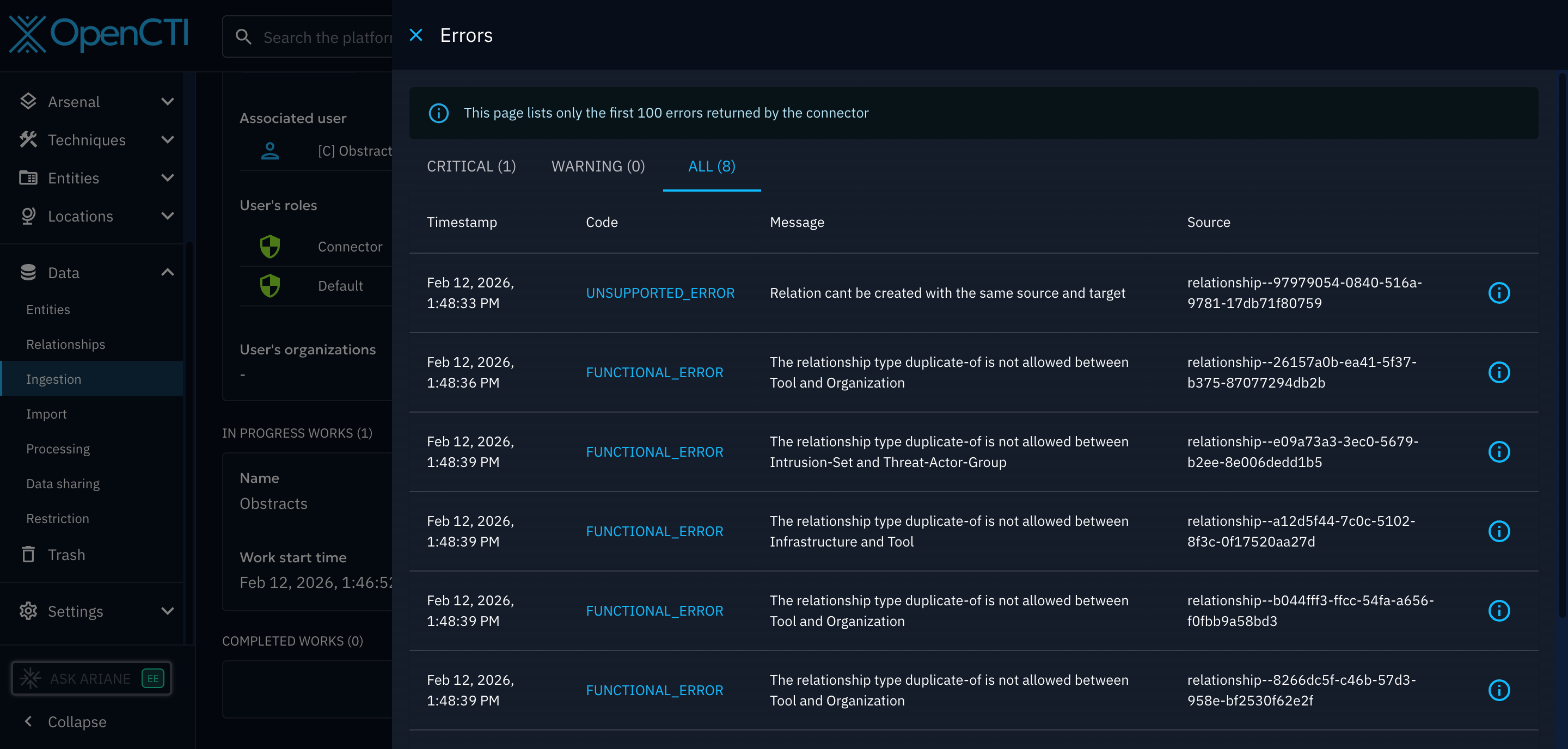
You must also ensure the objects your joining are supported by the relationship type selected, or, you will again, get errrosrs.
If you attempt to import:
- unsupported relationship type
- or supported type between unsupported entities
You will get ingestion errors or silently broken relationships.
This is a major limitation for platforms that encode logic via relationships.
Example: In Vulmatch we use not-vulnerable relationships to indicate when a CPE exists but is not affected. These relationship types must be rewritten inside connectors before ingestion. Whilst possible, this causes fidelity issues between the two products.
The lesson: do not get creative with relationship types. In some of our connectors, we rewrite relationship types inside the connector to solve this issue.
OpenCTI modifies your STIX objects
Every imported object is changed.
Understanding these modifications is critical for sync, deduplication, and exports.
ID rewriting
Even valid STIX IDs may be replaced.
OpenCTI generates deterministic IDs based on object properties to prevent duplicates.
Example:
- Attack Pattern IDs depend on (
nameORalias) ANDx_mitre_id(if exists)
Result:
- IDs change unless generated using OpenCTI logic
- mapping back to original producers becomes difficult
Exception:
- SCOs retain IDs if generated per STIX UUIDv5 rules
So even if you followed the STIX specification, or used a helper like the stix2 library, only the IDs of SCOs imported will match those you originally produced in OpenCTI.
Adding x_opencti_type
OpenCTI adds an internal classification layer.
Example:
- STIX
identity→ OpenCTI may classify as type; organization, sector, individual, etc.
This enables UI navigation and filtering.
Adding x_opencti_id
Every entity receives:
- an internal database identifier
- non-portable
- instance-specific
- included in exports
Think of it as a primary key, not an intelligence identifier.
To illustrate;
In OpenCTI instance 1:
id→indicator--1234x_opencti_id→abc-111
In OpenCTI instance B
id→indicator--1234x_opencti_id→xyz-999
It’s not an issue on ingest, however, when exporting objects from OpenCTI this property will be included.
Modifying TLP Markings
STIX objects can contain an object_marking_refs property where TLP levels are defined using Marking Definition objects.
We use official STIX 2.1 TLP v2 markings in our tools, but we quickly noticed OpenCTI was always modifying them into a mix of different IDs.
Let me explain the problem by showing you the Marking Definitions between TLPv1/v2:
- The official STIX 2.1 TLPv2:CLEAR object
id:marking-definition--94868c89-83c2-464b-929b-a1a8aa3c8487 - The OpenCTI TLPv2:CLEAR object
id:marking-definition--613f2e26-407d-48c7-9eca-b8e91df99dc9 - The official STIX 2.1 v1 TLPv1:WHITE object
id:marking-definition--613f2e26-407d-48c7-9eca-b8e91df99dc9
Notice how OpenCTI essentially write their own TLP:CLEAR object which inherits the ID of the official STIX 2.1 TLPv1:WHITE object.
If you upload an object with the official STIX 2.1 TLPv2:CLEAR marking, OpenCTI will transform it into their TLPv2:CLEAR marking.
For TLPv2 IDs that don’t exist in v1 (e.g. TLP:AMBER+STRICT), they invent their own.
For reference, here is how OpenCTI define all supported TLPs in the code.
The practical rules
After building multiple production connectors, these are the patterns that consistently work.
- Treat OpenCTI as a transformation engine
- Not a STIX database.
- Avoid custom SDOs/SCOs
- Translate them into STIX 2.1 core objects before ingestion.
- Assume custom properties will be dropped
- are an OpenCTI-supported custom field
- Rewrite relationships inside connectors. Use only
- supported types
- supported object pairs
- Expect ID drift. Plan for:
- mapping layers
- reconciliation logic
- external identifiers
- Never rely on markings remaining unchanged. Treat markings as:
- OpenCTI-managed
- not source-of-truth
In Summary
OpenCTI is extremely powerful, but it is not a passive STIX repository.
It is a graph intelligence platform that:
- ingests STIX
- normalizes it
- enriches it
- restructures it
- and exports a new representation
Once you design connectors with that assumption, most ingestion “bugs” disappear, because they are actually transformations.
Vulmatch
Know when software you use is being exploited.
Obstracts
Turn any blog into structured threat intelligence.
Stixify
Your automated threat intelligence analyst.
SIEM Rules
Your detection engineering AI assistant. Turn cyber threat intelligence research into highly-tuned detection rules.
CTI Butler
The most important cyber threat intelligence knowledgebases.
Cyber Threat Exchange
The Market Place for Cyber Threat Intelligence.
Discuss this post
Head on over to the dogesec community to discuss this post.
Open-Source Projects
All dogesec commercial products are built in-part from code-bases we have made available under permissive licenses.

Never miss an update
Sign up to receive new articles in your inbox as they published.